
Software LLC A lifelong love for engineering.
14 Agents, 2 Robots and 1 Human
· Sam George
I’m the only human at Second Half Software. The app I’m building (not yet public) is made with Claude, working as a team of fourteen AI agents, each with its own job description. This week I added two teammates we were sorely missing. They’re robots, and I’m very fond of them.
Self-improvement loops sometimes need robots
The loop I care about most goes: the team does something (adds a feature, fixes a bug, builds UI, etc), checks the result, figures out how to do it better and then puts that into practice. It works wonderfully for anything that can be automated, and Claude is very good at that. But when building an app, there are things automation can’t do.
For example:
- Press a physical button. The side button, the volume keys. Software can’t push those.
- Type a PIN on a locked phone. Once a phone has a passcode, the test runner can only talk to it while it’s unlocked, so a locked phone is a wall.
- Restart a phone and get past the first unlock afterwards.
- Tap a system screen that the runner isn’t allowed to touch, like Apple’s own sign-in sheet.
- Hear a sound. Is the phone actually making noise, or does it only say it is?
- See the screen. What a person sees on a locked or dark phone is not something the runner can screenshot.
My own phone has a passcode, like everyone’s does, and for a while I was the only member of the team who could test things on a locked phone. Of fourteen agents, one human with a PIN found the bugs the rest couldn’t. That was flattering for about a day, and then it was a bottleneck. Each manual test cycle took me about 40 minutes, and like all good developers, I’m lazy. So I knew I needed a solution. I needed a robot. Or two.
Build or buy?
Before building anything, I had Claude research it. I’ll say up front that it was a desk study: nothing in it was run, and the costs are estimates, not offers from anyone.
What it found:
- Tapster. Created by Jason Huggins, who also created Selenium and Appium, two tools I’ve leaned on for years. The robot sold for around $750, but its listing says it’s no longer for sale, and the designs are open source on GitHub. If you own a 3D printer, that’s a good place to start, and I’m grateful he shared it.
- Adapta’s MATT. A proper industrial phone tester with cameras and a vision API. The research found no cost anywhere, which usually means “if you have to ask”.
- A hobby robot arm (the Dobot Magician Lite) plus a stylus adapter and a few solenoids. Estimated at roughly $900 to $1,100 all in.
- A cheap DIY build from a small XY machine, a stylus and a servo or two. Estimated at a couple of hundred dollars, with calibration as the risk.
- Device farms like BrowserStack and AWS Device Farm. Useful for plenty, but I couldn’t confirm that any of them press hardware buttons or act on a locked screen.
On Android, the research found a software route: the debug bridge can set a PIN and tap the lock screen. On iPhone it found no software route at all.
Everything commercial looked like thousands of dollars and a wait for a reply, which doesn’t suit a company of one. Or a curious founder who loves to learn new things :)
The prototype
The question was what to order and what to build. The research suggested starting small: test the buttons and a grounded stylus tap by hand before buying anything big. That’s roughly what we did.
I decided on one machine per phone. The two phones can ring in the same minute, and one shared robot would have to take turns, which would turn a test of a missed stop into a test of the robot’s schedule. So there are two identical modules. Each is a small desktop CNC router, the SainSmart Genmitsu 3018-PROVer V2, with its spindle taken out and a stylus put in its place. One quirk I liked: the machine moves its bed back and forth, so the phone rides on the bed and the stylus travels along the bridge above it.
Things we decided along the way:
- Servos for the buttons. A small metal-gear servo per button station, pushing a loose printed pin through the case wall. The volume keys share one servo, so the two can never be pressed at the same time.
- A rigid stylus head that relies on the stylus’s own soft tip, with a thumb screw to set the height. No spring.
- A 3D-printed case for each phone, designed in OpenSCAD and printed on my Bambu Lab X1 Carbon. I printed it, found out where it was wrong, and the team redrew it. The legs were 3 mm short on the first iPhone case, and 127 mm apart turned out to be too far. The first print was on October 16, and the next day the case was proven in PLA. The final material is PETG.
- A webcam per phone, with its built-in microphones as the ears, so the robot can tell which phone is ringing.
- Measuring things myself. The stylus tip, the connection board, the machine’s travel. Claude can reason about a millimetre, but it can’t hold the calipers.
Some things we learned the hard way:
- The servos don’t let go. I pulled the USB cable in the middle of a press and the arm stayed exactly where it was, firm. Cut the signal and the servo doesn’t relax; it stays. So the controller now holds every servo at its rest angle whenever it isn’t pressing.
- Where you plug the USB hub in matters. On a front port of my Mac Studio, the hub sat too deep in a chain of hubs and the machine never showed up. On a rear port it appeared at once.
- The robot doesn’t type on a keyboard. The on-screen keys are too small for the stylus tip. It does the large targets, like PIN keys, buttons and swipes, and the phone’s own software types the text.
The robot doesn’t do everything, and I’m glad. Where the test runner can do the job, the test runner does it, unless the robot is faster. Pressing the side button to lock a phone beats changing a setting to 30 seconds and waiting.
The robot
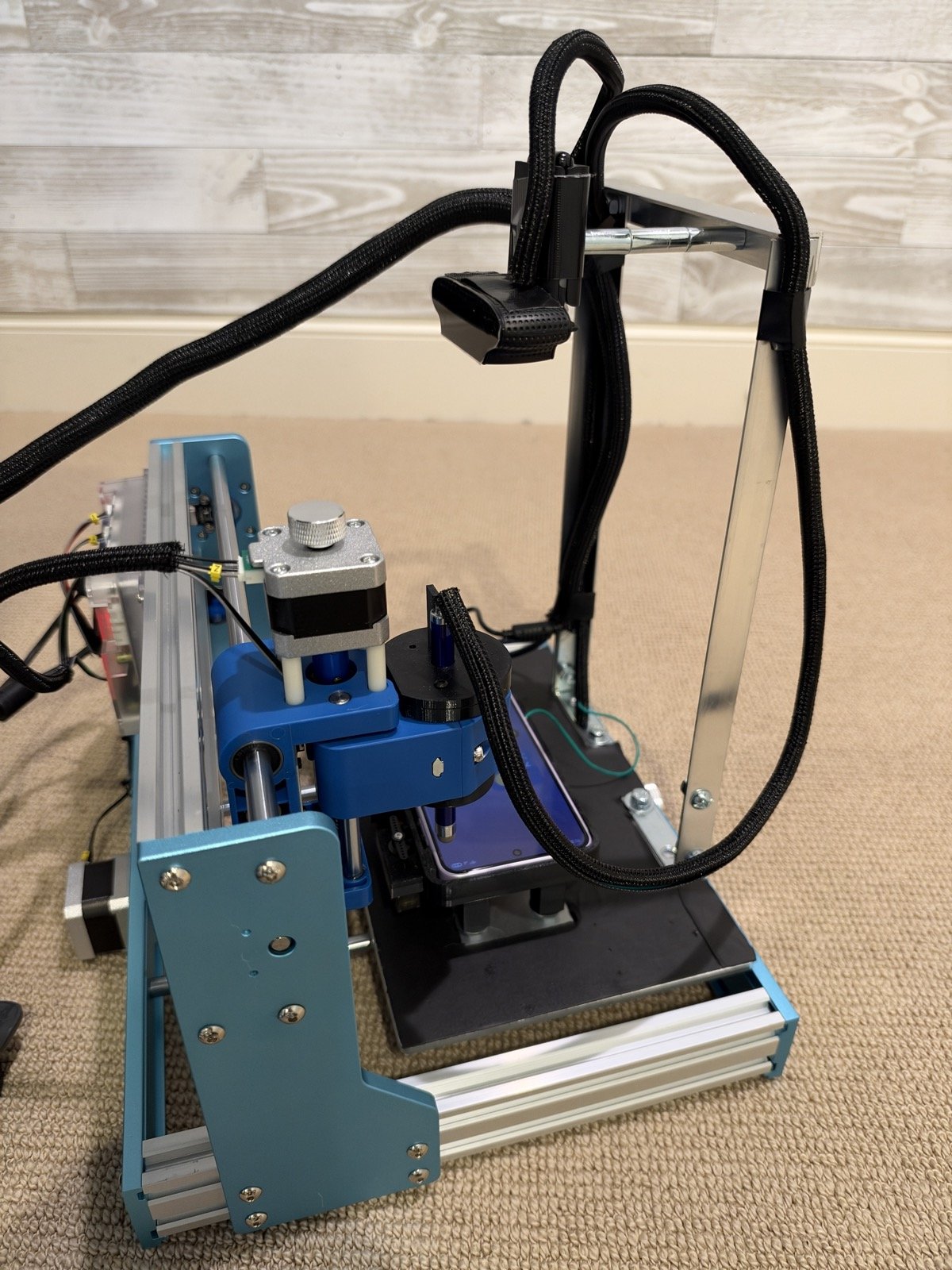
Both robots live in closed, sound-isolated enclosures now, with a test phone inside each. Nobody can touch them, so every recovery is remote: the robot looks through its camera to check the stylus is clear of the phone before it homes, and a button board that stops answering can be power-cycled through the USB hub.
The great thing is that my test agents can now click buttons, see and tap/swipe the screen and hear the phone. And most importantly, they can now test every aspect of the user experience that a real user encounters with their own phones.
Parts, per phone
Everything below is per robot. Two robots means two of each, except where I say shared. I’ve linked the specific part where I have one. The total per robot came up to just under $500.
| Part | What it does | Qty |
|---|---|---|
| SainSmart Genmitsu CNC 3018-PROVer V2 | The gantry. Moves the stylus over the phone. Speaks GRBL over USB | 1 |
| Capacitive stylus (8 mm tip) | Touches the screen. Clamped in the printed head where the spindle was | 1, plus a spare |
| Printed stylus head (PETG) and cap | Holds the stylus, height set with a thumb screw | 1 |
| Printed phone case (PETG, one part with four legs) | Holds the phone face up, carries the servos and the electronics | 1 |
| Printed pins (PETG) | Carry the servo’s push through the case wall to the buttons | 3 |
| M5 grub screws, 25 mm | Four pegs in the bed’s threaded holes that the case’s legs stand over | 4 |
| MG90S metal-gear micro servo | Presses the side button, and the volume keys (one servo for both) | 2, plus a spare |
| Seeed Studio XIAO RP2040 (headers soldered) | The servo controller. Runs the button firmware, takes commands from the Mac | 1 |
| Perfboard with 3-pin male headers | The servo connection board. Servos plug in here | 1 |
| 5 V 4 A power supply | Powers the servos, kept beside the machine | 1 |
| Barrel-jack screw-terminal adapter | Takes the supply’s plug to two screw terminals | 1 |
| Logitech C920s Pro webcam | The eyes and the ears: it photographs the screen and its built-in microphones hear the phone | 1 |
| USB-C data cables, high-flex | One to the controller, one to the phone | 2 |
| M2 x 6 screws and an M2 washer | Hold the connection board and the XIAO under the case | 5 screws, 1 washer |
| M3 heat-set inserts (50-pack) | For the stylus head’s thumb screw | 1 per head; one pack shared |
| M3 x 20 knurled thumb screw | Sets the stylus height | 1 |
| M3 self-tapping screws | Hold the stylus head’s cap | 3 |
| Silicone hookup wire, 22 to 26 AWG | Servo power and signal | as needed |
| Flexible ground wire | Runs from the top of the stylus to the side of the phone | 1 |
| Powered USB hub with switchable ports (Adafruit was the first one I looked at) | Connects the Mac to everything, and lets the Mac cut a board’s power to restart it | 1, shared |
| Filament (PETG, and PLA for test prints) | The printed parts | a few spools |
Wiring, per phone
The diagram below shows how one robot is connected. The two are wired the same way, and the iPhone’s and the Galaxy’s modules use the same pins.

USB runs from the Mac’s rear port through one powered hub to the gantry, the webcam and the button board; the board’s two signal pins drive the servos, which take their power from a separate 5 V supply. The stylus is grounded to the side of the phone in the case by a flexible wire (very important or you get multiple taps per stylus click).
In detail, every connection on one robot:
| From | To | Carries |
|---|---|---|
| Mac Studio, rear port | Powered USB hub | USB |
| Hub | 3018 gantry controller | USB (GRBL commands) |
| Hub | XIAO RP2040 | USB-C: commands, and the board’s power |
| Hub | C920s webcam | USB: camera and microphones |
| Hub | Test phone | USB-C |
| 5 V 4 A supply | Barrel-jack screw terminals | +5 V and ground |
| Screw terminals | Servo power rail | +5 V and ground |
| XIAO pin D0 | Side-button servo, signal (orange) | 3.3 V signal |
| XIAO pin D1 | Volume servo, signal (orange) | 3.3 V signal; one way for volume up, the other for down |
| XIAO GND | Servo rail ground | A common ground |
| Servo rail +5 V | Each servo’s red wire | Power |
| Servo rail ground | Each servo’s brown wire | Ground |
| Top of the stylus | Side of the phone | Flexible ground wire |
| XIAO 5 V pin | Nothing | Left unconnected |
Closing
Fourteen agents wrote the software that drives these robots, and two robots now give those agents the hands and eyes they were missing. The one human ordered the parts, printed the cases, held the calipers, and is now off the hook for manual tests.
What surprised me is how much of the work was ordinary. A case that was 3 mm out. A USB hub in the wrong socket. The lesson I take from it is that a self-improving loop is only as good as the least-reachable part of what it’s testing, and that fixing the least-reachable part is a very good use of a week.
If you’re building something like this, borrow freely. The parts list and the wiring are above (the cases are shaped to our two phones, so I haven’t published those) and Claude can help you connect, build and test firmware, and teach your test harness to operate it.
As always, reach out if there’s anything I missed or you have any questions.